



자료 정보
버전 내역
상세 설명
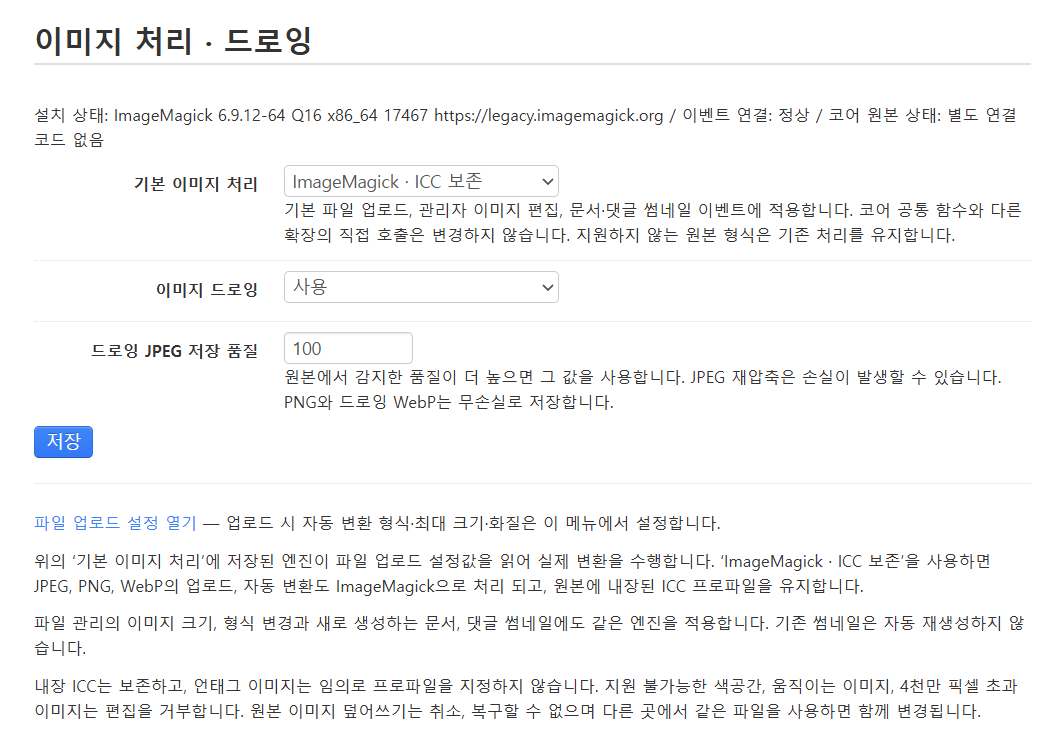
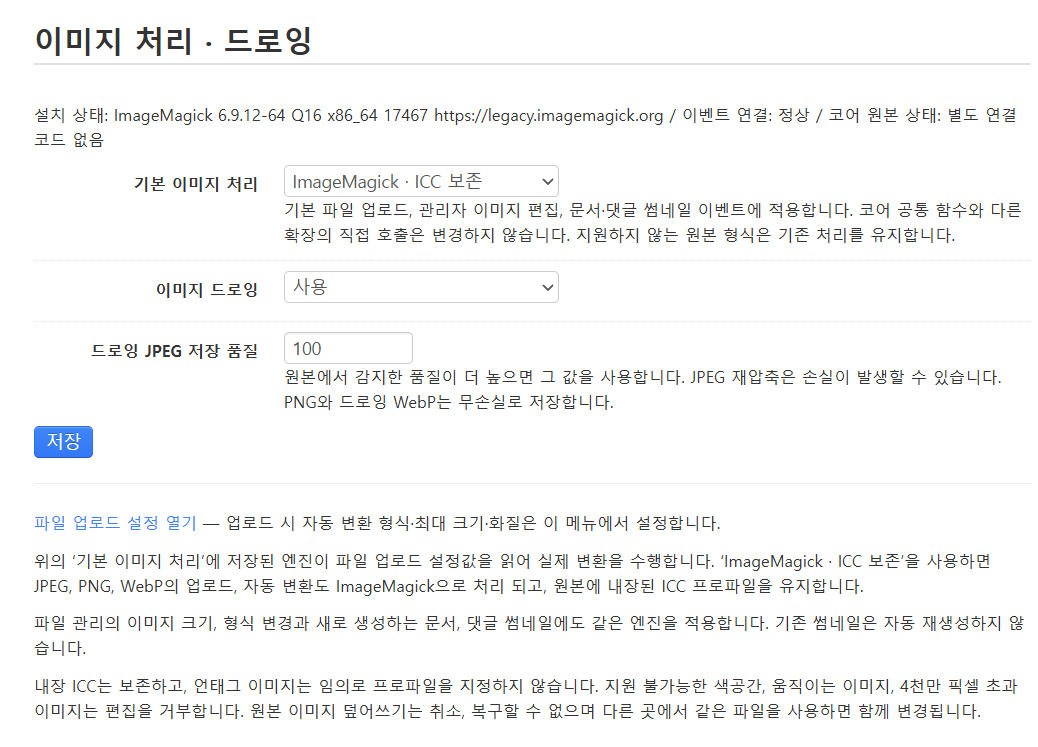
이미지 처리 · 드로잉
이미지를 업로드하거나 편집할 때 원본에 내장된 ICC 프로파일을 보존하고, 게시판에 첨부한 이미지에 표시를 추가할 수 있는 라이믹스 모듈입니다.
이미지 처리 및 ICC 프로파일 보존
관리자 설정에서 ‘ImageMagick ICC 보존’을 선택하면, 라이믹스 파일 업로드 설정에 따라 지원하는 JPEG, PNG, WebP 이미지의 자동 크기 조절과 형식 변환을 처리합니다. 라이믹스 기본 파일 관리에서 이미지 크기나 형식을 변경할 때도 적용됩니다.
원본에 내장된 ICC 프로파일을 보존하고, 프로파일이 없는 이미지에는 임의로 추가하지 않습니다.
라이믹스 기본 문서, 댓글 썸네일을 사용하는 경우, 새로 생성하는 썸네일에도 게시판 수정 없이 적용됩니다. 기존 썸네일은 자동으로 다시 생성되지 않습니다. 스킨이나 다른 확장 기능이 자체적으로 생성하는 썸네일은 해당 기능의 처리 방식을 따릅니다.
첨부 이미지 드로잉
간단한 이미지 편집을 위한 기능 입니다.
게시판의 글쓰기, 수정 화면에서 첨부된 이미지 썸네일 밑 ‘드로잉’ 버튼을 누르면 펜, 형광펜, 화살표, 도형, 글자를 추가할 수 있습니다.
라이믹스 기본 첨부 목록을 사용하는 게시판에서 이용할 수 있습니다.
자체 첨부 화면을 사용하는 스킨은 별도 연동이 필요할 수 있습니다.
드로잉 결과는 원본 해상도로 합성해 기존 첨부 이미지에 저장합니다. ‘원본에 적용’을 누르면 원본을 덮어쓰고, 같은 파일을 사용하는 다른 곳에도 변경이 반영됩니다.
설치 후 설정
서버에 PHP Imagick 확장이 필요합니다. (카페24 호스팅 환경은 모듈 설치만 하면 바로 사용할 수 있습니다.) 모듈을 설치한 뒤 관리자 화면에서 기본 이미지 처리 엔진을 선택하고, 드로잉을 사용하려면 ‘이미지 드로잉’을 활성화하세요. 업로드 시 적용할 자동 변환 형식, 최대 크기, 화질은 라이믹스의 파일 업로드 설정에서 지정합니다.
v 1.3.6
- Windows 드로잉 저장 오류 수정 : XAMPP에서 파일 잠금으로 저장이 실패하던 문제를 수정했습니다.
- 업로드 EXIF 처리 개선 : ‘EXIF 제거’를 켜면 원본의 표시 방향을 픽셀에 반영한 뒤 EXIF를 제거합니다. 끄면 변환이 필요 없는 이미지는 원본 그대로 저장합니다.
- 갤러리 썸네일 방향 보정 : ‘ImageMagick · ICC 보존’에서 새 문서, 댓글 썸네일을 만들 때 EXIF 회전/반전 정보를 반영합니다. 내장 ICC 프로파일은 유지합니다.
- 내장 Noto Sans KR 글꼴을 제거해 배포 파일 용량을 줄였습니다. 드로잉 글자는 브라우저에서 기기 글꼴로 그려 저장합니다.
*1.3.6 버전에서는 아래 두개 파일이 삭제 됐습니다. 쉬운설치나 덮어쓰기 업데이트에는 아래 파일이 남아 있게 됩니다. 사용되지 않는 파일이니 그대로 두어도 문제되지 않지만, 삭제 하는 것을 권장 합니다.
,/modules/stack_image/resources/NotoSansKR.ttf
,/modules/stack_image/resources/OFL.txt



사용자 피드백 8
카페24 호스팅(php8.4)의 경우 잘 동작했습니다.
다만 에디터에 따라서 드로잉 버튼이 안보이는 경우가 있습니다.
라운드에디터가 그렇더군요. 라운드에디터의 css가 드로잉 버튼을 안보이게 처리합니다.
기본 ck나 ck5, tinimce8등에서는 드로잉 버튼이 잘 보였습니다.
테스트용도로 윈도 pc에서 돌리는 xampp환경(php8.4)에서 imagemagick 설치해서 테스트해봤는데...
팝업까지는 떳는데 저장하면 메시지는 뜨는데 팝업이 안닫히더군요.
수정된 파일으로 저장도 안되었구요.
어디가 문제인지 찾다가 포기했는데... 뭐 테스트용도로 사용하는 것이니 저는 별문제가 안되지만 이런 경우도 있었다라고 참고해주세요~
환경별 자세한 피드백 감사합니다~!
라운드에디터에서 버튼이 보이지 않는 문제와 Windows XAMPP에서 저장이 실패하는 문제는 호환성 예로 기록해 두고, 당분간 현재 동작을 유지하고, 호환성을 점검으로 반영해 보겠습니다.
라운드에디터 대응은 레이아웃 css에
.roundeditor__attachments .xefu-list-images li.xefu-file-image:has(.stack-board-drawing-button) { margin-bottom: 36px; overflow: inherit; }
요렇게 추가했습니다.
라운드에디터가 overflow: hidden을 적용해놨더라구요.
xampp에서 "원본에 적용"을 누르면
개발자모드 네트워크에서 응답하는게 아래와 같은 내용입니다.
{
"rx_error_location": "C:\\xampp\\htdocs\\modules\\stack_image\\controllers\\Drawing.php:109",
"error": -1,
"message": "\uc774\ubbf8\uc9c0\uac00 \ubcc0\uacbd\ub418\uc5c8\uc2b5\ub2c8\ub2e4. \ud3b8\uc9d1\ucc3d\uc744 \ub2eb\uace0 \ub2e4\uc2dc \uc5f4\uc5b4 \uc8fc\uc138\uc694."
}
메시지는
이미지가 변경되었습니다. 편집창을 닫고 다시 열어 주세요.
이거에요.
윈도우 xampp에서 돌아가게 수정한 controllers 폴더의 Drawing.php 소스코드입니다.
gpt가 애써줬네요.
<?php
namespace Rhymix\Modules\Stack_image\Controllers;
use Rhymix\Modules\Stack_image\Models\Files;
use Rhymix\Modules\Stack_image\Models\Processor;
use Rhymix\Modules\Stack_image\Models\Drawing as Renderer;
/** Destructive annotation of an authorized attachment, retaining its file_srl and path. */
class Drawing extends Base
{
/** Both inspection and save require a genuine same-origin POST. */
protected function _check(): void
{
$config = \ModuleModel::getModuleConfig('stack_image');
if (
($_SERVER['REQUEST_METHOD'] ?? '') !== 'POST'
|| !\Rhymix\Framework\Security::checkCSRF()
|| ($config->drawing ?? 'N') !== 'Y'
|| !extension_loaded('imagick')
) {
throw new \RuntimeException('드로잉을 사용할 수 없거나 요청을 확인할 수 없습니다.');
}
}
/** The core uploader supplies a file ID while Leaf supplies the image URL. */
protected function _resolve(): object
{
$src = (string)\Context::get('image_src');
if ($src !== '') {
return Files::resolve($src);
}
$id = filter_var(
\Context::get('file_srl'),
FILTER_VALIDATE_INT,
['options' => ['min_range' => 1]]
);
return Files::resolveId((int)$id);
}
/** Return metadata only after resolving the actual attachment and edit permission. */
public function procStack_imageInspect(): object
{
try {
$this->_check();
$file = $this->_resolve();
$image = Processor::open($file->stack_image_path);
try {
$format = strtolower($image->getImageFormat());
if (!in_array($format, ['jpeg', 'jpg', 'png', 'webp'], true)) {
throw new \RuntimeException('JPEG, PNG, WebP 이미지만 지원합니다.');
}
if (!in_array(
$image->getImageOrientation(),
[\Imagick::ORIENTATION_UNDEFINED, \Imagick::ORIENTATION_TOPLEFT],
true
)) {
throw new \RuntimeException('회전 정보가 있는 이미지입니다. 먼저 파일 관리에서 회전을 정리한 뒤 편집해 주세요.');
}
$this->add('image_info', [
'file_srl' => (int)$file->file_srl,
'width' => $image->getImageWidth(),
'height' => $image->getImageHeight(),
'format' => $format,
'icc' => Processor::icc($image) !== '',
'revision' => Files::revision($file->stack_image_path),
]);
if ((string)\Context::get('image_src') === '') {
$this->add(
'image_url',
rtrim(\Context::getDefaultUrl(), '/') . substr($file->uploaded_filename, 1)
);
}
} finally {
$image->clear();
}
return new \BaseObject();
} catch (\Throwable $e) {
return new \BaseObject(-1, $e->getMessage());
}
}
/** Validate, encode a snapshot, replace the attachment, and update its existing file record. */
public function procStack_imageSave(): object
{
$lock = null;
$snapshot = null;
$temporary = null;
$backup = null;
$db = null;
$path = null;
$replaced = false;
$keepBackup = false;
try {
$this->_check();
$file = $this->_resolve();
$path = $file->stack_image_path;
$data = (string)\Context::get('drawing_data');
if (strlen($data) > 2 * 1024 * 1024) {
throw new \RuntimeException('드로잉 정보가 너무 큽니다.');
}
$items = json_decode($data, true, 32, JSON_THROW_ON_ERROR);
if (!is_array($items)) {
throw new \RuntimeException('드로잉 정보를 확인해 주세요.');
}
Renderer::validate($items);
/*
* Lock and verify the original file. Imagick must read a separate
* snapshot because Windows may prevent another handle from reading
* a file while this handle owns an exclusive lock.
*/
$lock = fopen($path, 'rb');
if (!$lock || !flock($lock, LOCK_EX)) {
throw new \RuntimeException('이미지를 수정 중입니다. 잠시 후 다시 시도해 주세요.');
}
$fileStat = fstat($lock);
if (!$fileStat || !isset($fileStat['size'])) {
throw new \RuntimeException('이미지 파일 정보를 읽을 수 없습니다.');
}
rewind($lock);
$ctx = hash_init('sha256');
if (hash_update_stream($ctx, $lock) === false) {
throw new \RuntimeException('이미지 파일을 읽을 수 없습니다.');
}
$currentRevision = hash_final($ctx);
$clientRevision = trim((string)\Context::get('image_revision'));
if (
$clientRevision === ''
|| !hash_equals($currentRevision, $clientRevision)
) {
throw new \RuntimeException('이미지가 변경되었습니다. 편집창을 닫고 다시 열어 주세요.');
}
rewind($lock);
$snapshot = tempnam(dirname($path), '.stack-source-');
if ($snapshot === false) {
throw new \RuntimeException('이미지 임시 파일을 만들 수 없습니다.');
}
$snapshotHandle = fopen($snapshot, 'wb');
if (!$snapshotHandle) {
throw new \RuntimeException('이미지 임시 파일을 열 수 없습니다.');
}
try {
$copied = stream_copy_to_stream($lock, $snapshotHandle);
if ($copied === false || $copied !== (int)$fileStat['size']) {
throw new \RuntimeException('원본 이미지를 임시 파일로 복사하지 못했습니다.');
}
} finally {
fclose($snapshotHandle);
}
$image = Processor::open($snapshot);
try {
$icc = Processor::icc($image);
$format = strtolower($image->getImageFormat());
$width = $image->getImageWidth();
$height = $image->getImageHeight();
Renderer::flatten($image, $items);
$config = \ModuleModel::getModuleConfig('stack_image');
$quality = max(
(int)($config->drawing_quality ?? 95),
$image->getImageCompressionQuality()
);
if ($format === 'webp') {
$image->setOption('webp:lossless', 'true');
}
$blob = Processor::encode($image, $format, $quality, $icc);
} finally {
$image->clear();
}
if (strlen($blob) > 50 * 1024 * 1024) {
throw new \RuntimeException('편집 결과가 저장 가능한 용량을 초과했습니다.');
}
$fileConfig = \FileModel::getFileConfig((int)$file->module_srl);
if ((\Context::get('logged_info')->is_admin ?? 'N') !== 'Y') {
$attached = executeQuery(
'file.getAttachedFileSize',
(object)['upload_target_srl' => $file->upload_target_srl]
);
if (
!$attached->toBool()
|| strlen($blob) > (float)$fileConfig->allowed_filesize * 1024 * 1024
|| (int)$attached->data->attached_size - (int)$file->file_size + strlen($blob)
> (float)$fileConfig->allowed_attach_size * 1024 * 1024
) {
throw new \RuntimeException('게시판의 첨부파일 용량 제한을 초과합니다.');
}
}
$temporary = tempnam(dirname($path), '.stack-drawing-');
if (
$temporary === false
|| file_put_contents($temporary, $blob) !== strlen($blob)
|| !chmod($temporary, fileperms($path) & 0777)
) {
throw new \RuntimeException('이미지를 저장하지 못했습니다.');
}
/*
* Keep a backup for rollback if the database update fails.
* On Windows, move the original aside first because rename()
* generally cannot overwrite an existing destination.
* On Unix-like systems, copy the backup and use atomic rename().
*/
$backup = tempnam(dirname($path), '.stack-backup-');
if ($backup === false) {
throw new \RuntimeException('원본 이미지 백업 파일을 만들 수 없습니다.');
}
if (PHP_OS_FAMILY === 'Windows') {
if (!unlink($backup)) {
throw new \RuntimeException('원본 이미지 백업 파일을 준비하지 못했습니다.');
}
} elseif (!copy($snapshot, $backup)) {
throw new \RuntimeException('원본 이미지 백업에 실패했습니다.');
}
$db = \Rhymix\Framework\DB::getInstance();
$db->begin();
// Release the source lock only after the snapshot and backup exist.
flock($lock, LOCK_UN);
fclose($lock);
$lock = null;
if (PHP_OS_FAMILY === 'Windows') {
if (!rename($path, $backup)) {
throw new \RuntimeException('기존 이미지 파일의 백업에 실패했습니다.');
}
}
if (!rename($temporary, $path)) {
if (PHP_OS_FAMILY === 'Windows' && is_file($backup)) {
@rename($backup, $path);
}
throw new \RuntimeException('이미지를 교체하지 못했습니다.');
}
$temporary = null;
$replaced = true;
$out = executeQuery('file.updateFile', [
'file_srl' => $file->file_srl,
'module_srl' => $file->module_srl,
'upload_target_srl' => $file->upload_target_srl,
'uploaded_filename' => $file->uploaded_filename,
'is_cover' => $file->cover_image,
'file_size' => strlen($blob),
'width' => $width,
'height' => $height,
]);
if (!$out->toBool()) {
throw new \RuntimeException('파일 정보를 갱신하지 못했습니다.');
}
if (($fileConfig->save_changelog ?? 'N') === 'Y') {
foreach (['D' => (int)$file->file_size, 'I' => strlen($blob)] as $type => $bytes) {
$log = executeQuery('file.insertFileChangelog', [
'change_type' => $type,
'file_srl' => $file->file_srl,
'file_size' => $bytes,
'uploaded_filename' => $file->uploaded_filename,
]);
if (!$log->toBool()) {
throw new \RuntimeException('파일 사용량 기록을 갱신하지 못했습니다.');
}
}
}
$db->commit();
$db = null;
$replaced = false;
if ($backup && is_file($backup)) {
@unlink($backup);
}
$backup = null;
clearstatcache(true, $path);
// Cached thumbnails are derived data, not a preserved original or editing history.
$target = (int)$file->upload_target_srl;
$comment = \CommentModel::getComment($target);
if ($comment->isExists()) {
$target = (int)$comment->get('document_srl');
}
if ($target > 0) {
\Rhymix\Framework\Storage::deleteDirectory(
\RX_BASEDIR . 'files/thumbnails/' . getNumberingPath($target, 3)
);
}
$this->add('image_revision', Files::revision($path));
$this->add('file_size', strlen($blob));
return new \BaseObject();
} catch (\Throwable $e) {
if ($db) {
$db->rollback();
}
// Restore the original file if replacement succeeded but DB work failed.
if ($replaced && $path && $backup && is_file($backup)) {
if (PHP_OS_FAMILY === 'Windows') {
@unlink($path);
}
if (@rename($backup, $path)) {
$backup = null;
$replaced = false;
} else {
// Preserve the backup file rather than deleting the only original copy.
$keepBackup = true;
}
}
return new \BaseObject(-1, $e->getMessage());
} finally {
if ($lock && is_resource($lock)) {
@flock($lock, LOCK_UN);
@fclose($lock);
}
if ($temporary && is_file($temporary)) {
@unlink($temporary);
}
if ($snapshot && is_file($snapshot)) {
@unlink($snapshot);
}
if ($backup && is_file($backup) && !$keepBackup) {
@unlink($backup);
}
}
}
}
윈도우 서버에서 원본 교체 전에 잠기고, 경로 확인 과정에 해시 계산 실패하는 과정으로 보이네요. 배포판으로 수정하는 것은 테스트 해보고 주말쯤 반영하겠습니다.
xampp에서 파일 잠금으로 저장이 실패하던 문제를 수정했습니다. 테스트에서 해당 문제는 서버 환경에 따라 발생 가능성이 있어 수정 반영 했습니다.
윈10, xampp 아파치 2.4 1개월내 버전인데... 아무튼..., php 8.4 셋팅 환경에서 잘 동작합니다~
저장하면 팝업 닫히는데 썸네일은 새로 바뀐게 반영되나 에디터상에서는 반영이 안되는데... 저장하면 바뀐걸로 잘 들어가 있으니 실사용하는데는 큰 문제는 없어 보입니다.
이는 리눅스 호스팅 환경에서는 에디터상에서도 바로 바뀌던데... 뭔가 차이가 있는거겠죠.
수정 감사합니다.^^